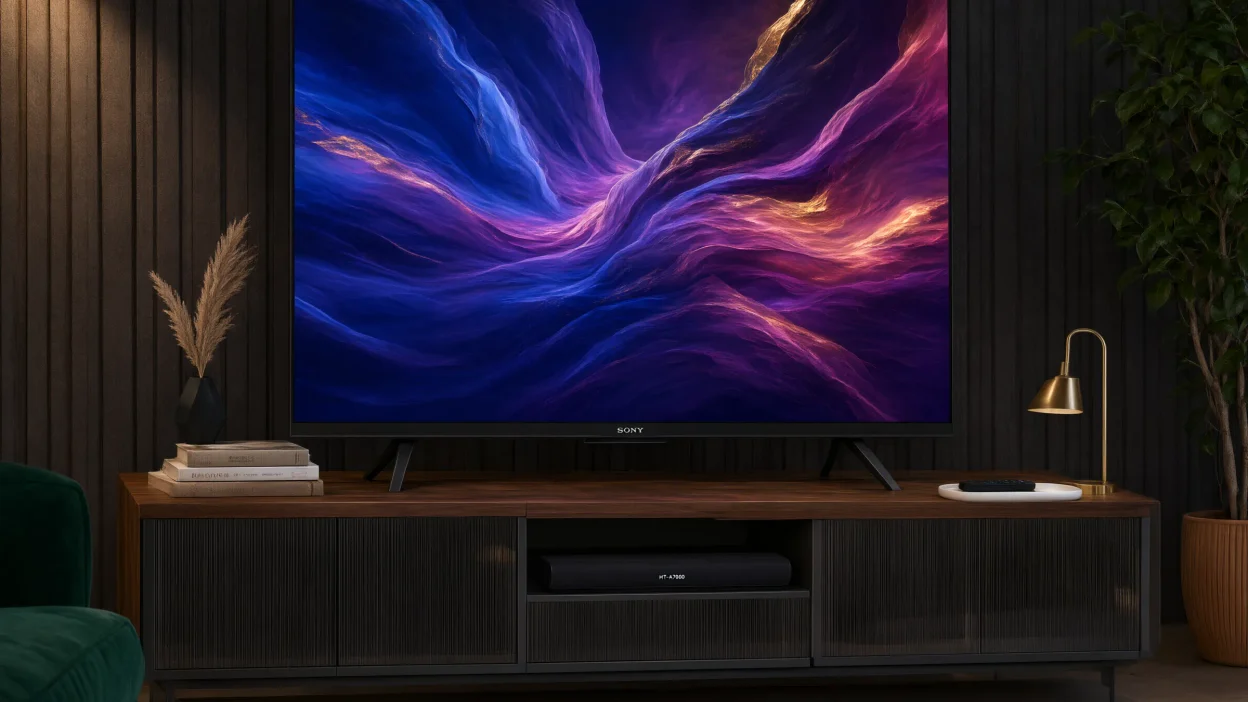
Choosing furniture for an 85-inch television is different from choosing a stand for a smaller screen.
The TV is large, heavy, and visually dominant, so small mistakes become much more noticeable.
Before shopping, focus on these main measurements:
- TV width
- TV height
- TV depth
- Distance between the TV feet
- TV weight
- TV stand width
- TV stand depth
- TV stand height
- Weight capacity
- Available wall and floor space
The most important rule is simple: measure your actual TV instead of relying only on the 85-inch label.
How Wide Is an 85 Inch TV?
An 85-inch TV measurement refers to the diagonal distance from one corner of the screen to the opposite corner.
It does not mean the television is 85 inches wide.
A typical 85-inch 16:9 screen has a theoretical screen width of about 74.1 inches and a screen height of about 41.7 inches.
The physical television can be slightly wider because of its frame and design. (TV Sizes)
In many current buying guides, an 85-inch TV is listed at around 74 to 76 inches wide. (Home To Sight)
That difference matters when choosing a console.
Quick 85-Inch TV Size Guide
| Measurement | Approximate Size |
| Diagonal screen | 85 inches |
| Screen width | About 74 inches |
| Physical TV width | About 74–76 inches |
| Screen height | About 42 inches |
| Typical stand width | 80–90+ inches |
These are general measurements. Always check your TV manufacturer’s specifications before buying furniture.
What Size TV Stand for 85 Inch TV?
For most people, an 80- to 90-inch TV stand is a good starting point for an 85-inch TV.
An 80-inch stand gives you a little extra width beyond a typical 74–76-inch TV. An 84- or 86-inch console gives you more breathing room.
A 90-inch or larger stand can work especially well in a large living room.
Several current guides recommend stands around 80 inches or wider for this TV size, while some recommend 80–96 inches depending on the room and desired proportions. (Home To Sight)
TV Stand Width Chart
| TV Stand Width | How It Works With an 85-Inch TV |
| Under 70 inches | Usually too small |
| 70–74 inches | Only works in special cases |
| 75–79 inches | Possible if the TV feet fit |
| 80–84 inches | Great choice for many setups |
| 85–90 inches | Excellent for a balanced look |
| 90–96 inches | Great for large rooms and extra storage |
| 96+ inches | Best for large entertainment walls |
There is one important exception.
Can You Put an 85 Inch TV on a Smaller Stand?
Yes, but only if the TV’s feet fit securely on the stand.
The width of the television is not always the same as the distance between its feet.
Some TVs use a center pedestal, while others have legs near the outer edges.
A center-mounted base can allow an 85-inch TV to sit on a narrower console.
An edge-leg design may require a much wider surface. (TV Sizes)
This is why TV foot spacing is often more important than screen size when you are using the TV’s original feet.
Before buying a narrow console, measure the distance from the outside of one foot to the outside of the other.
If the feet are 62 inches apart, for example, a 60-inch console would not be a good choice.
The feet should sit fully on a stable surface.
What Is the Minimum TV Stand Width for an 85 Inch TV?
There is no single minimum width that works for every 85-inch television.
For a typical TV with wide-set feet, 75 inches is about the lowest range you should consider, while 80 inches or wider is a more practical choice.
Current guides commonly place the comfortable range around 80–86 inches or more. (TVStandTips)
A smaller stand may work when:
- The TV uses a center pedestal.
- The TV feet have a narrow spacing.
- The manufacturer’s instructions allow the setup.
- The stand has enough depth.
- The stand’s weight rating is high enough.
- The TV remains stable without excessive overhang.
Do not choose a narrow stand simply because it saves floor space.
Check the actual TV base first.
Should a TV Stand Be Wider Than an 85 Inch TV?
In most cases, yes.
A stand that is slightly wider than the TV often creates a more balanced appearance.
It also gives you space for accessories such as a soundbar, streaming device, speakers, or decorations.
For an 85-inch TV that is about 75 inches wide, an 80- to 90-inch console provides a comfortable visual balance.
For example:
75-inch TV + 80-inch stand:
About 2.5 inches of extra stand width on each side.
75-inch TV + 86-inch stand:
About 5.5 inches of extra stand width on each side.
75-inch TV + 90-inch stand:
About 7.5 inches of extra stand width on each side.
A wider console is not automatically safer, however.
The TV feet still need to sit properly on the top surface, and the stand must have an appropriate weight rating.
How Tall Should a TV Stand Be for an 85 Inch TV?
Stand height is just as important as width.
You want the center of the screen to be close to your seated eye level.
This helps create a comfortable viewing position and prevents you from looking too far up or down.
An 85-inch screen is roughly 42 inches tall, so half of the screen height is about 21 inches.
For example, if your seated eye level is around 40 inches from the floor:
40 inches − 21 inches = 19 inches
That puts the top of the TV stand around 19 inches from the floor before adding the TV’s base height.
This is only an example. Your actual ideal height depends on:
- Sofa height
- Seated eye level
- TV feet height
- TV thickness
- Room layout
- Personal comfort
Many large-TV setups look best with a relatively low-profile console.
A Simple TV Stand Height Formula
You can use this basic method:
Seated eye height − half of TV height = approximate stand surface height
Measure your eye level while sitting normally on your sofa.
Then measure your television’s actual height.
This gives you a better starting point than choosing a stand based only on its appearance.
How Deep Should a TV Stand Be for an 85 Inch TV?
Depth is easy to overlook.
An 85-inch television may have a large footprint even when the screen itself is thin.
If you are using the original TV feet, the stand needs enough front-to-back space for the feet to sit securely.
Many 85-inch TVs can have a depth of roughly 16–22 inches depending on the model and whether the stand is included. (Home To Sight)
Before buying a console, measure:
- TV depth
- Foot depth
- Distance from the front edge of the TV to the feet
- Available depth on the stand
A deeper console can also provide more storage, but avoid choosing furniture that sticks too far into a walkway.
How Much Weight Can a TV Stand for 85 Inch TV Hold?
Weight capacity is one of the most important safety checks.
Do not assume that a large-looking console can hold an 85-inch television.
Check your TV’s exact weight in its manual or manufacturer’s specifications. Then check the furniture’s maximum supported weight.
Some current guides recommend looking for a stand with a substantial capacity because many large TVs can weigh well over 100 pounds depending on the model. (Fishers Quality Furniture)
Your total load can also include:
- Soundbar
- Center speaker
- Gaming console
- Cable box
- Blu-ray player
- Decorative items
Choose a stand that comfortably exceeds the total load rather than operating right at its maximum rating.
Never Ignore the Manufacturer’s Limits
The safest approach is to follow the TV and furniture manufacturer’s instructions.
If the stand says it supports a maximum of 100 pounds and your TV weighs 105 pounds, do not use it.
Best TV Stand Styles for an 85 Inch TV
The best style depends on your room and storage needs.
1. Low-Profile TV Console
A low-profile console is one of the most popular choices for a large television.
It keeps the furniture visually low and allows the huge screen to remain the main focal point.
Best for:
- Modern living rooms
- Minimalist spaces
- Large open rooms
- Wall-mounted TVs
- Low sofas
2. Mid-Century TV Stand
A mid-century design can soften the appearance of a very large television.
Look for:
- Long horizontal lines
- Simple legs
- Wood finishes
- Closed storage
- Clean shapes
The long shape works naturally with a wide screen.
3. Modern Entertainment Center
A larger entertainment center can provide storage for multiple devices.
It may include:
- Cabinets
- Shelves
- Drawers
- Cable openings
- Soundbar space
This is useful if the TV is the center of a complete home entertainment system.
4. Farmhouse TV Console
A farmhouse console can work well in traditional or cozy living rooms.
Choose a long design with enough width for the TV and enough storage for your equipment.
5. Floating TV Console
A floating console is attached to the wall rather than sitting directly on the floor.
This can create a clean modern look and make the room feel more open.
However, the wall and mounting hardware must be appropriate for the installation.
If the TV itself is wall-mounted, the console does not need to physically support the television.
TV Stand for 85 Inch TV With Storage
Storage is another major factor.
An 85-inch TV often becomes the center of a living room, so your console may need to hold several devices.
Think about what you actually own before choosing the cabinet.
For Gaming
You may need room for:
- PlayStation or Xbox
- Nintendo Switch
- Controllers
- Headsets
- Games
- Charging stations
Open shelves can make gaming equipment easier to access.
For Streaming
If you mostly stream content, you may need less storage.
A simple console with one or two shelves may be enough for:
- Streaming device
- Soundbar
- Router
- Small accessories
For Home Theater
A larger entertainment center may be better if you have:
- AV receiver
- Center speaker
- Blu-ray player
- Gaming system
- Subwoofer
- Multiple streaming devices
Make sure equipment has enough ventilation. Do not pack electronics tightly into a closed cabinet.
TV Stand for 85 Inch TV and Soundbar
If you use a soundbar, plan for it before buying your TV stand.
An 85-inch television leaves a lot of horizontal space, but the soundbar can still affect the setup.
Check:
- Soundbar width
- Soundbar height
- Stand depth
- Space below the TV
- TV sensor clearance
- Speaker placement
If the soundbar sits directly in front of the television, make sure it does not block the bottom portion of the screen or any remote-control sensor.
A long 80- to 90-inch console often gives you plenty of room for a large soundbar.
What About a Wall-Mounted 85 Inch TV?
Wall mounting changes the furniture requirements.
If the TV is securely mounted to the wall, the console does not have to physically support the TV.
This gives you more flexibility.
You could use:
- 60-inch console
- 70-inch console
- 80-inch console
- 90-inch console
- Floating shelf
The choice becomes more about appearance, storage, and room proportions.
Even so, a console that is much narrower than the screen can look visually unbalanced.
For a large 85-inch television, a long console often creates a stronger horizontal design.
How High Should an 85 Inch TV Be Mounted?
The same eye-level principle applies when the TV is mounted.
You generally want the center of the screen near your seated eye level.
Do not automatically mount an 85-inch TV high on the wall just because the screen is large.
A very high TV can make you tilt your head upward for long periods.
Measure your seating position first.
If you plan to put a console underneath the TV, leave enough room for:
- Soundbar
- Remote access
- Decorations
- Ventilation
- Cables
The exact wall-mount height should also follow the TV manufacturer’s installation instructions.
How Far Should You Sit From an 85 Inch TV?
Viewing distance depends on the content and your personal preference.
A large screen can be viewed from several distances, but sitting extremely close may make the picture feel overwhelming.
A common approach is to use the TV’s diagonal size as a starting point and then adjust based on whether you prefer a cinematic or more relaxed view.
For an 85-inch television, around 8.5 to 11 feet can be a useful starting range depending on viewing preference and the rule being used. (TV Sizes)
Your ideal distance also depends on:
- 4K resolution
- Content quality
- Vision
- Room size
- Personal preference
There is no single distance that is perfect for everyone.
How to Choose the Best TV Stand for 85 Inch TV
Use this simple checklist before buying.
Step 1: Measure Your TV
Measure:
- Width
- Height
- Depth
- Weight
Do not rely only on “85 inches.”
Step 2: Measure the TV Feet
Measure the distance between the outside edges of the feet.
This is especially important if you are using a tabletop setup.
Step 3: Measure Your Room
Measure the wall and floor space where the console will go.
Remember to account for:
- Doors
- Walkways
- Windows
- Other furniture
- Electrical outlets
Step 4: Pick the Stand Width
For many 85-inch TVs, start around 80 inches wide.
Move toward 86–90+ inches if you have enough room and want a more substantial look.
Step 5: Check Weight Capacity
Compare the TV weight with the stand’s maximum weight rating.
Step 6: Check Depth
Make sure the TV feet and other equipment fit safely.
Step 7: Check Height
Use your seated eye level to choose a comfortable viewing height.
Step 8: Plan Your Accessories
Think about your:
- Soundbar
- Gaming console
- Streaming box
- Speakers
- Cable box
- Decorations
This prevents you from buying a console that looks good but lacks usable space.
Common Mistakes to Avoid
Buying Based Only on “85 Inch”
The 85-inch number describes the diagonal, not the actual width.
Always check the manufacturer’s dimensions.
Choosing a Stand That Is Too Narrow
A very narrow stand can create a top-heavy appearance and may not support wide-set TV feet.
Forgetting the Feet
The TV chassis can be 75 inches wide while its feet have a different spacing.
Always measure the base.
Ignoring Weight Capacity
A console can look strong but still have a low weight rating.
Check the specifications.
Choosing the Wrong Height
A beautiful console is not useful if it puts the screen too high or too low.
Forgetting Soundbar Space
A large TV setup often includes a large soundbar. Make sure there is enough room.
Blocking Ventilation
Electronics need airflow. Avoid placing equipment in a cramped, sealed space.
Overcrowding the Top
An 85-inch TV already makes a strong visual statement.
Too many decorations can make the setup look messy.
PAA: People Also Ask
What size TV stand is best for an 85 inch TV?
An 80- to 90-inch stand is a good starting range for many 85-inch TVs.
The exact choice depends on the TV’s physical width and foot spacing.
A stand around 80 inches is a practical option, while a wider 85- to 90-inch console can provide a more balanced appearance.
Can an 85 inch TV fit on a 70 inch stand?
It can in some cases, but you must check the TV’s foot spacing.
A center pedestal may allow an 85-inch TV to sit on a narrower console, while wide-set feet may not. Measure the base before buying. (TV Sizes)
Is an 80 inch TV stand big enough for an 85 inch TV?
For many 85-inch TVs, yes. An 80-inch stand is wider than the typical 74–76-inch TV body and is commonly recommended as a practical size.
However, the TV feet and weight rating must still fit the stand. (Home To Sight)
Should a TV stand be wider than the TV?
Usually, yes. A slightly wider stand can provide better visual balance and extra space for accessories.
For an approximately 75-inch-wide 85-inch TV, an 80- to 90-inch stand can work well.
Can I put an 85 inch TV on a 60 inch stand?
Only in special cases where the TV uses a narrow center base and the manufacturer allows it. Do not assume that the screen size alone makes a 60-inch stand safe.
How high should a TV stand be for an 85 inch TV?
The correct height depends on your seated eye level and the TV’s height.
A good starting method is to subtract half the TV’s height from your seated eye height to estimate the desired stand surface height.
How deep should a TV console be for an 85 inch TV?
Measure your TV feet and the television’s actual depth.
The stand must provide a stable surface for the feet without unsafe overhang. The exact depth varies by TV model.
Can I use a wall-mounted TV with a smaller console?
Yes. When the TV is properly wall-mounted, the console does not carry the TV’s weight.
You can choose the console based mainly on storage, appearance, and room proportions.
What is the best style of TV stand for an 85 inch TV?
Low-profile, modern, mid-century, farmhouse, and large entertainment consoles can all work.
The best choice depends on your room, storage needs, and personal style.
Article Summary
Choosing a TV stand for 85 inch TV starts with measuring the television itself.
An 85-inch TV is usually about 74–76 inches wide, so an 80- to 90-inch TV stand is a strong starting range for many rooms. (Home To Sight)
However, width is not the only measurement that matters.
You should also check the distance between the TV feet, stand depth, TV weight, stand weight capacity, and viewing height.
If your TV has a center pedestal, you may be able to use a narrower stand.
If it has wide-set legs, you will usually need a wider console. (TV Sizes)
For a simple buying decision, measure your TV first, choose a stand that safely supports its base, and then select the width and style that fit your room.
Conclusion
The right TV stand for 85 inch TV should be stable, wide enough for your TV base, strong enough to support its weight, and comfortable for everyday viewing.
For most setups, an 80- to 90-inch TV stand is a good place to start.
An 80-inch console works well for many rooms, while an 85- or 90-inch model gives you more visual balance and storage space.
But do not buy a stand based on the screen size alone.
Check your TV’s exact width, foot spacing, depth, and weight first.
Then consider stand height, soundbar space, storage, cable management, and room layout.
The best console is not simply the biggest one you can find.
It is the one that safely supports your TV while making the entire entertainment area feel balanced, comfortable, and organized.

Emma Wilson is a writer at MeaningVibz who enjoys exploring emoji meanings, texting expressions, and online communication trends. She helps readers understand how emojis and slang are used in different situations by providing clear explanations and relatable examples for everyday messaging.